How to Install a Battery Monitor in an RV (Step-by-Step)
On this page
Picture a monitor that reads 70 percent on the evening the inverter shuts off for low voltage. The monitor itself may be working perfectly. A shunt counts only the current that flows through it, so a load connected directly to the battery’s negative post drains the bank without ever reaching the count, and the percentage stays too high. A capacity setting that’s too large or a sync that never happens can throw it off too. Wire it right, set it up right and test it under load, and the monitor keeps a true running total of every amp going into and out of the bank.
This guide covers monitors whose shunt goes in the bank’s negative cable, such as Victron’s SmartShunt and BMV-712 Smart and Renogy’s 500A Battery Monitor. Two monitors are exceptions and follow their own manuals: Thornwave lists its PowerMon-5S for the positive side only, and the Lippert Battery Monitor covered by manual CCD-0006452 also goes in the positive cable. If you haven’t picked a monitor yet, our battery monitor buyer’s guide compares six models.
TL;DR
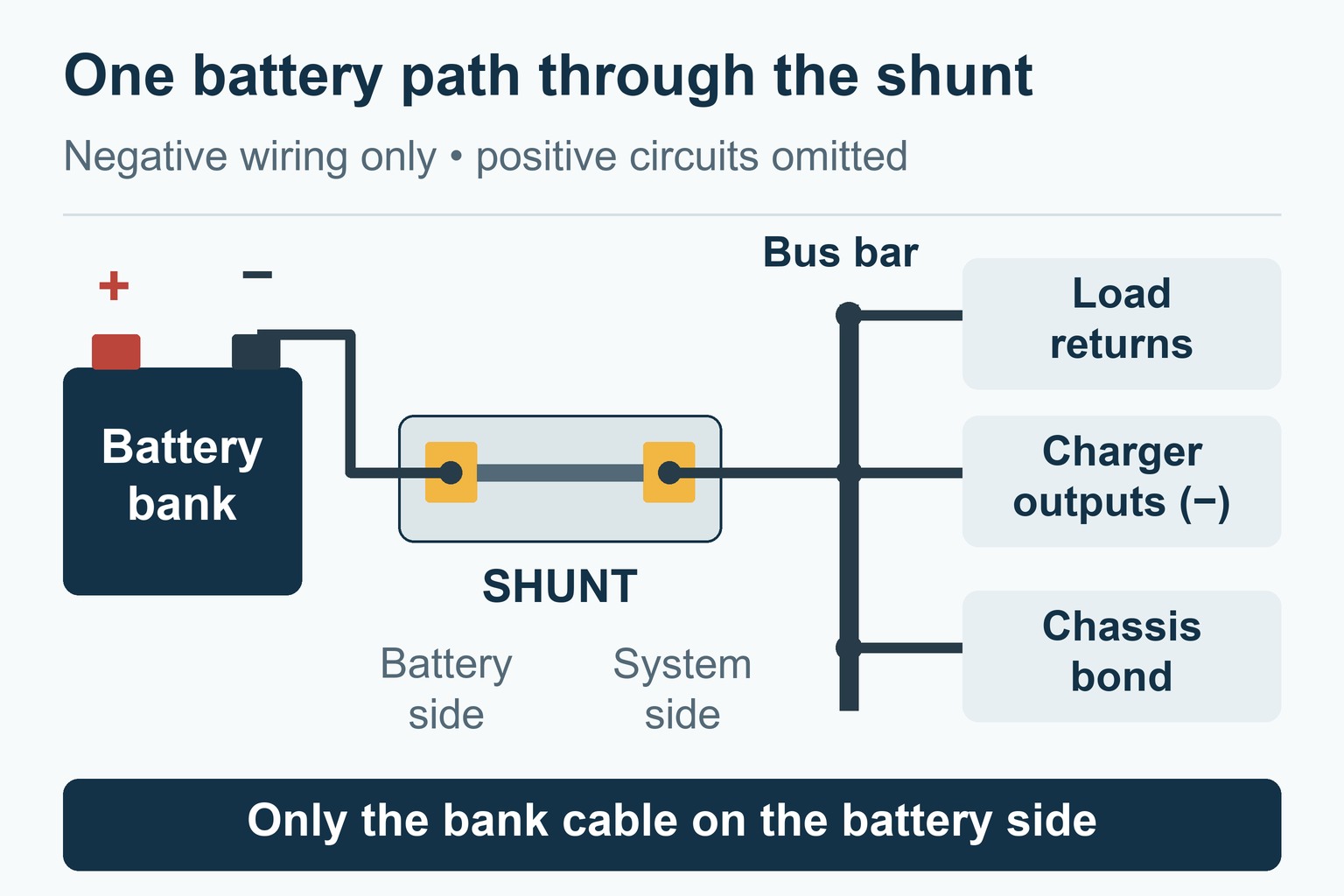
- The rule: the shunt’s battery side takes one cable, the one to the bank’s negative. Every load, every charger and the chassis bond go on its system side.
- The order: isolate every source, wire the shunt, and bolt its battery cable to the bank last.
- The sense lead: fused right at the battery positive. Victron fits a 1 A fuse to its leads; Renogy’s manual lists none, so add one.
- The setup: the bank’s full capacity entered, full-charge settings matched to your charger, and 100 percent set by a real full charge.
- The test: the monitor shows net current, so charging reads positive only when the chargers supply more than the loads use.
Size the Shunt and Cable First
A shunt’s rating is the current it can measure, and your system’s busiest moment has to fit inside it. Work it out from nameplates and datasheets, once for each direction:
- Discharge: the inverter at its continuous rating plus any DC loads that may run alongside it, at the lowest voltage the bank falls to under that load.
- Charge: the chargers that may work together, such as the converter, solar and DC-DC charging, at their maximum output.
- Surges: an inverter’s start-up surge, against the shunt’s short-duration rating where the maker lists one.
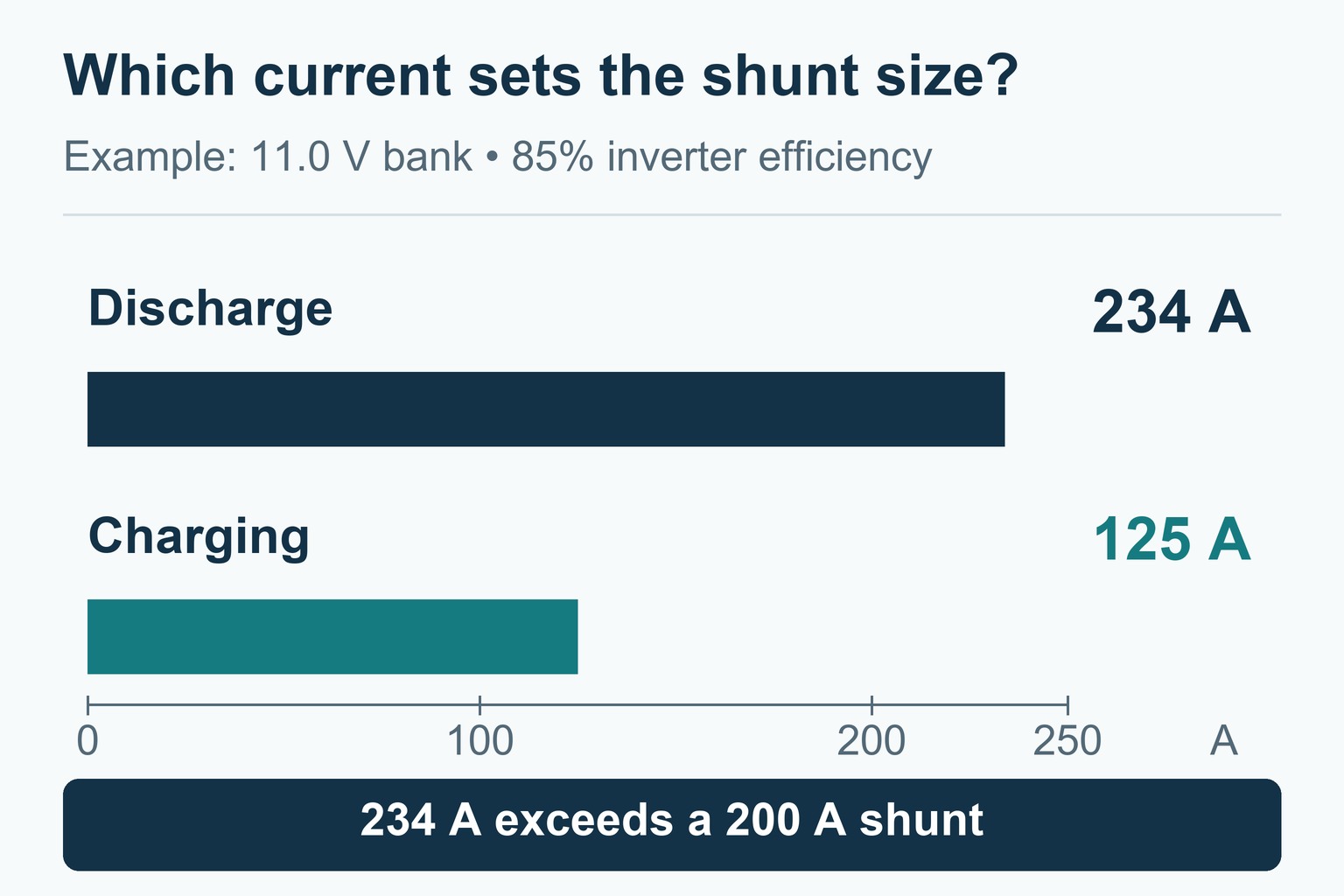
An example with assumed values: a 2,000 W inverter at 85 percent efficiency, 20 A of DC loads running alongside it, and three chargers.
Scroll sideways to see every column.
| Item | Assumption | Current |
|---|---|---|
| Inverter at full output | Bank at 12.0 V | 196 A |
| Same inverter, sagging bank | Bank at 11.0 V | 214 A |
| DC loads at the same time | Furnace fan, water pump, lights | 20 A |
| Discharge total | At 11.0 V | 234 A |
| Charge total | 55 A converter, 40 A solar, 30 A DC-DC | 125 A |
Discharge decides here, at about 234 A. A 200 A shunt is too small, a 300 A continuous rating leaves some headroom, and the 500 A shunts supplied with the SmartShunt 500A, the BMV-712 and Renogy’s 500A monitor leave plenty. A bigger inverter or a slide motor running with everything else changes the answer, so use your own figures.
The new cable between the bank’s negative and the shunt, and one from the shunt to a negative bus bar if you add it, carry the same current as the bank’s main positive cable. Size them like that cable, not like whichever branch cable used to sit on the battery terminal. The shunt’s rating doesn’t protect them; the main fuse on the positive side does, so they have to suit that fuse, as our RV fuse and breaker guide explains.
What You’ll Need
Tools
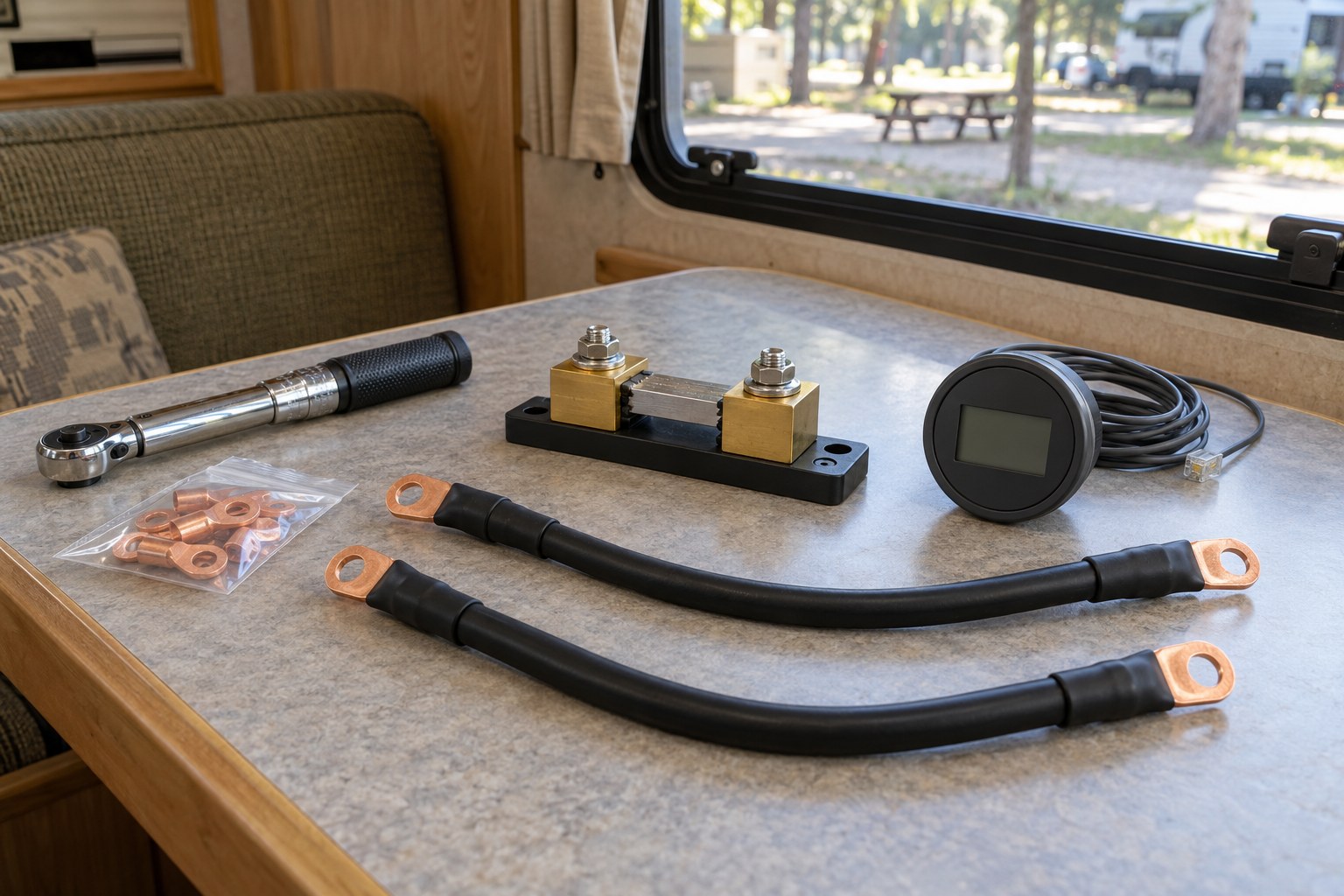
Heavy cable needs proper crimping and torque tools. If you’d rather not crimp, order battery cables made up to length with the lugs you need.
- Digital multimeter
- Insulated wrenches or sockets for the battery terminals and shunt studs
- Torque wrench covering the shunt’s and the battery’s values
- Hydraulic or ratcheting lug crimper and a cable cutter, unless your cables come made up
- Wire stripper and small crimper for the sense lead and fuse holder
- Heat gun, drill, safety glasses, and rings and watches off
- Worth having: a DC clamp meter, a fish tape for the display cable, and tape and a marker for tagging cables
Materials
- The monitor kit: shunt, display or app, data cable if it’s wired, and the sense lead
- Battery cable for the run from the bank to the shunt, sized as above
- Copper lugs matched to the cable size and the stud: M10 on the SmartShunt 500A and larger, M8 on the 300 A model
- Adhesive-lined heat shrink for every lug
- A negative bus bar rated for the total current, if the stud can’t take every system-side cable
- An inline fuse holder and fuse for the sense lead, if the kit has none
- Grommets or split loom for every pass-through, cable ties and mounting screws
Before You Start
- Monitor manual on hand, with the battery-side and system-side studs identified
- Bank capacity, chemistry and nominal voltage noted
- Absorption and float voltages of every charger noted, plus any current at which a charger stops
- Shunt rating checked against the current you worked out
- Places chosen for the shunt and the display, and the cable route measured
- Photos taken of the existing wiring
- Food sorted: an absorption fridge with electronic controls needs 12 V even on propane, so plan for it to stop while the bank is disconnected
- Bank fully charged if you can manage it, so the first sync comes quickly
- Every power source listed, from shore power and the generator to solar, DC-DC or alternator charging, the 7-way charge line and portable chargers
Install the Shunt Step by Step
Work in this order. The new battery cable stays off the bank until step 10, so the RV’s negative side isn’t connected to the battery while you work on it.
- Shut off and isolate every source. Unplug shore power and shut down the generator. Unplug a trailer’s 7-way connector; on a motorhome, keep the engine off, and if a battery combiner or relay can still tie the starting and house banks together, isolate that link too. Switch off the RV’s DC loads before opening disconnects or removing fuses. Switch off the inverter/charger, any DC-DC charger and portable chargers, then isolate each one’s DC cables at its disconnect or fuse, as its manual describes: an off button doesn’t disconnect a cable. For solar, follow the controller’s manual; Victron’s, for one, has you open a DC-rated PV switch before the battery side. Then open the battery disconnect.
- Cover the positive and check the isolation. Switching things off never makes the battery terminals dead, so cover every exposed positive terminal first. Then go down your list of sources and confirm how each one is cut off from the wiring you’re about to handle: unplugged, its disconnect open or its fuse out. A dark display, a near-zero clamp reading or the battery’s voltage can’t prove that. If you can’t tell how a source is isolated, stop before you loosen anything.
- Map every cable on the bank’s negative. Before you loosen anything, trace and tag each one: load returns such as the converter or distribution panel, the inverter, a tongue jack or breakaway feed and a detector lead; charger negatives such as the solar controller and the DC-DC charger; and the chassis bond. Links between the batteries stay where they are. Identify any thin wire before it moves. If it carries current for a load or a charger, it goes to the system side; a temperature sensor, a BMS communication lead or a charger’s voltage-sense wire goes where its own manual says. A motorhome’s starting battery is a separate circuit, so leave its cables alone.
- Take the system cables off the bank’s negative. Unbolt every load, charger and chassis cable you tagged, tape or cap each lug, and tie the cables back where they can’t swing onto a terminal. Keep the positive terminals covered all the same: a second battery or a connection you missed can still complete a circuit through a wrench.
- Mount the shunt. Screw it to a solid surface a short cable run from the bank, battery-side stud toward the bank, with room for a torque wrench on both studs. Victron rates the SmartShunt IP21, so it needs a dry spot out of road spray. Flooded lead-acid batteries give off hydrogen and acid mist while charging, and Renogy’s manual asks for enough ventilation to clear the gas. Keep the shunt out of that air, and where a cable passes through the battery compartment’s wall, seal around it without blocking a vent.
- Fit the battery cable to the shunt, not yet to the bank. Crimp the lugs, seal each crimp with heat shrink, and bolt one end to the battery-side stud, BATTERY MINUS on Victron’s shunts and B- on Renogy’s. Victron allows at most 21 Nm (15.5 lb-ft) on the SmartShunt’s M10 bolts and 10 Nm (7.4 lb-ft) on the 300 A model’s M8 ones. Cover the free end and leave it off the battery until step 10. Nothing else goes on this stud. On the bank’s negative terminal, only the links between batteries and any sensor leads may share the post with the new cable; any other current there would be missing from the count.
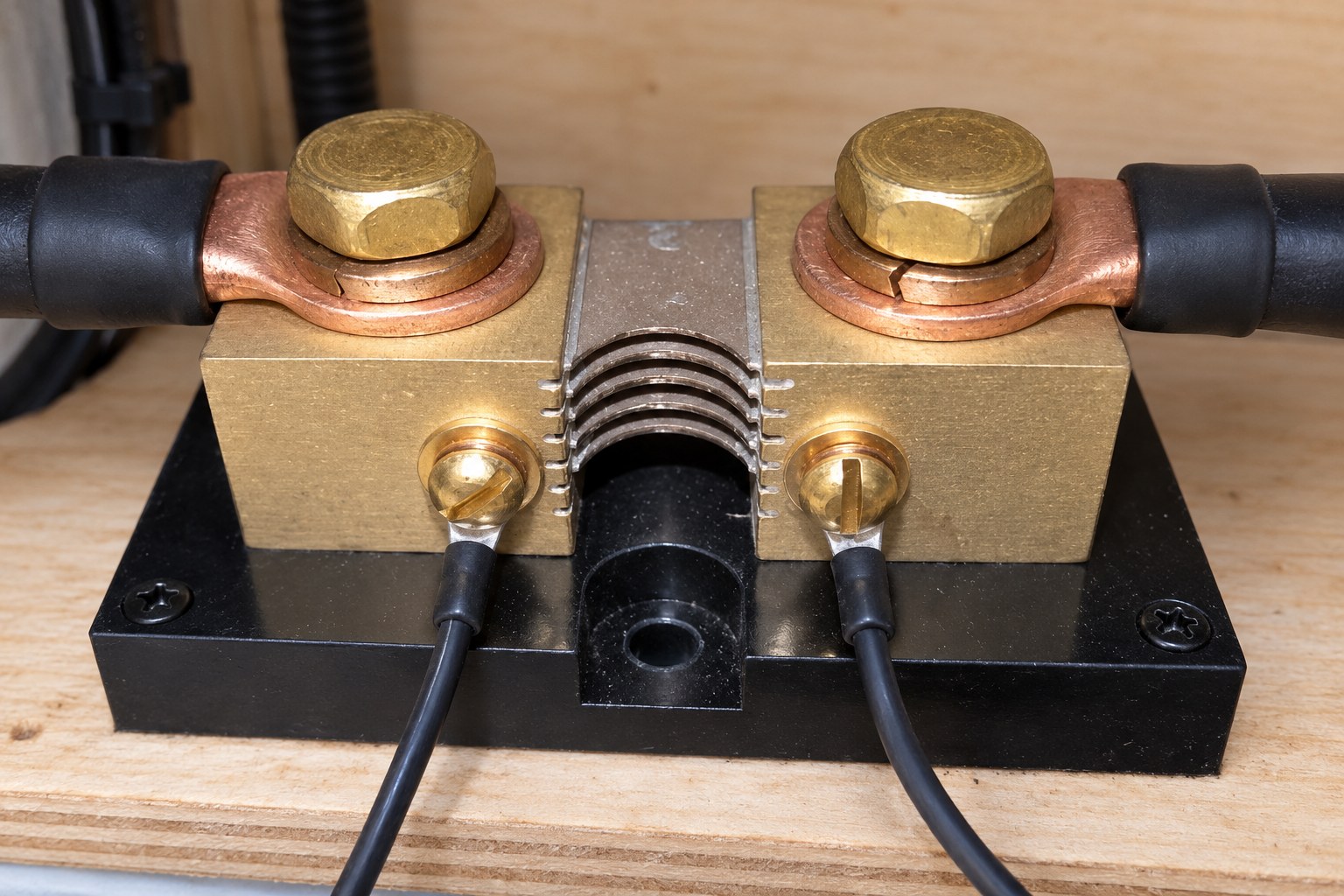
A shunt works through a tiny voltage drop: at full rated current, a 500 A/50 mV shunt drops just 50 mV, and the monitor turns that into amps. - Land every load and charger on the system side. Every load or charger return you tagged, plus the chassis bond, goes on the system-side stud: SYSTEM MINUS on current Victron shunts (LOAD MINUS before 2020) and P- on Renogy’s. If they won’t all fit, run one cable from that stud to a negative bus bar, sized like the battery cable, and land the rest on the bar. Put nothing between a lug and the contact face: Victron’s wiring guide puts the washer, spring washer and nut on top.
- Run the fused sense lead. This thin wire gives the monitor the bank’s voltage, which it needs for power readings and to recognize a full battery, and it powers the SmartShunt. Its fuse goes at the battery end, so a chafed wire can’t overheat, and it stays out of its holder until step 10. Victron supplies its red lead with a 1 A slow-blow fuse: take the fuse out, then push the ferrule into the Vbatt+ terminal and put the ring on the bank’s positive terminal. Renogy’s shunt has two B+ terminals and either will do; its manual calls for a 0.3 to 0.75 mm² wire, roughly 22 to 18 AWG, but names no fuse. On a 12 V system, a 1 A fuse like Victron’s is one option, as long as the fuse and its holder are rated for the system’s DC voltage and can interrupt the current a short could draw from the bank. That choice protects the wire; it isn’t a Renogy figure. Take the lead straight to the bank’s positive terminal, not behind the disconnect, or the monitor goes dark whenever the switch is open. Fit any temperature sensor, midpoint or starter-battery lead now. Victron’s starter-battery option reads correctly only if that battery’s negative reaches the system side, for example through the chassis bond.
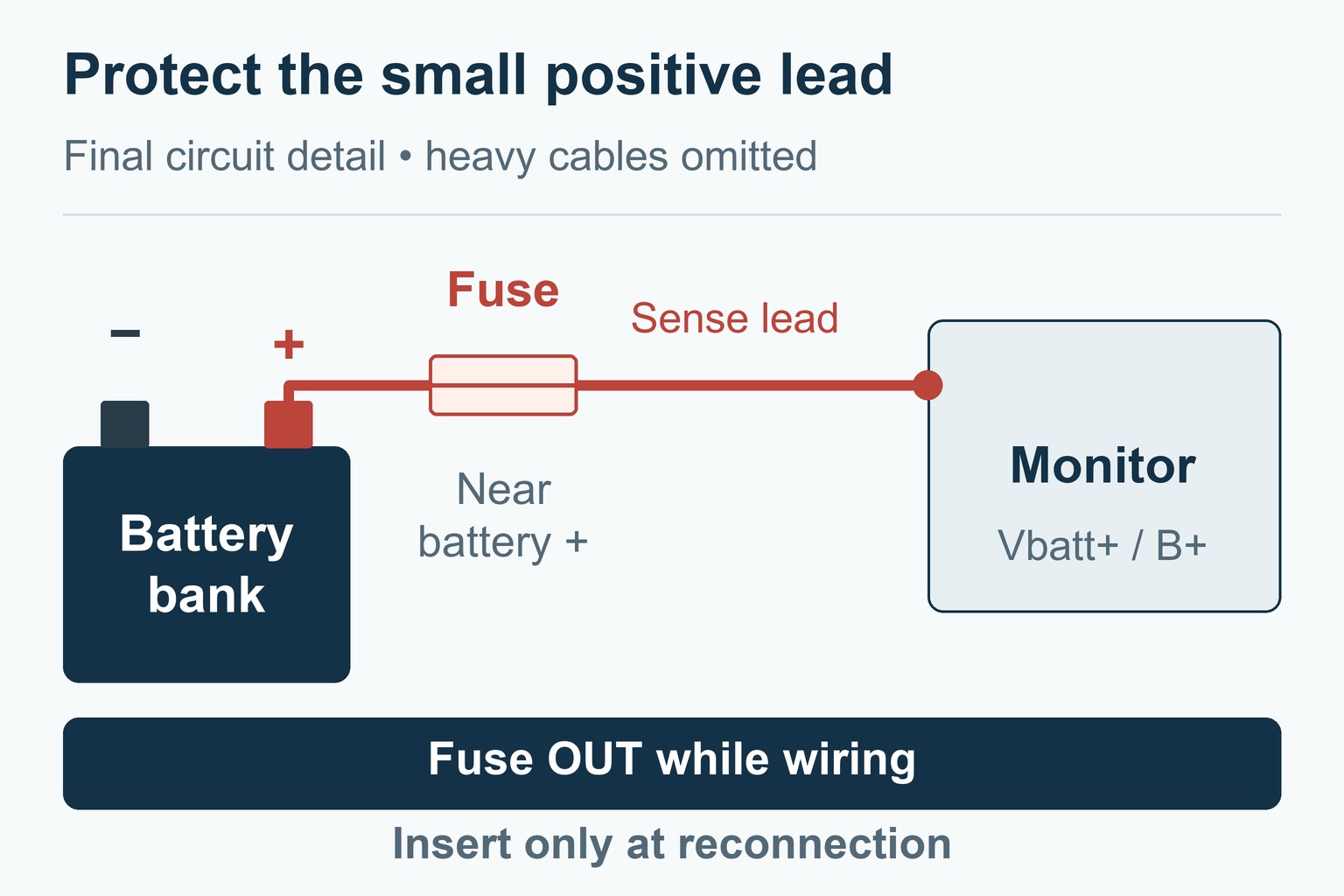
With the sense-lead fuse out, the short wire from battery positive to the holder remains live. The open holder breaks that battery feed to the monitor. - Connect the display or the app. Route the data cable along existing wire runs, with a grommet at every metal or floor pass-through, clear of heater ducts and sharp edges, and tie it so vibration can’t rub it through. Renogy’s 500A monitor has a 20 ft (6 m) shielded cable and needs a 94 × 57 mm (about 3.7 × 2.2 in) cutout; the BMV-712’s display head needs a round hole of 52 mm, about 2 in. The SmartShunt has no display and talks to the VictronConnect app over Bluetooth, which Victron says reaches 10 to 15 m (33 to 49 ft), less with a metal chassis in the way. If a cable comes up short, buy the maker’s longer one; a phone cable that looks the same may be wired differently.
- Reconnect in order. Check the routing and torque of every connection you’ve made, and leave the equipment’s DC feeds isolated for now. With flooded batteries, air out the compartment. Then bolt the free end of the battery cable to the bank’s negative terminal at the battery maker’s torque; that’s the last heavy connection. Insert the sense-lead fuse and check that the monitor comes on. Close the battery disconnect and bring each piece of equipment back in the order its manual gives, including any precharge step an inverter calls for. Solar goes back battery side first, then the panels, the order our MPPT controller wiring guide walks through.
Set Up the Monitor and Sync It to 100%
A few settings make the difference between a gauge and a guess. Three apply to every monitor:
- Capacity: the bank’s full capacity, never just the part you mean to use. For a new bank that’s the rated figure, so a parallel pair of new 100 Ah batteries counts as 200 Ah; for a worn bank with a tested capacity, use the tested figure. Renogy asks for the battery’s actual effective capacity, and on lead-acid Victron asks for the 20-hour (C20) rating.
- Full-charge detection: the condition the monitor treats as 100 percent, set from your charger’s end-of-charge voltage and the battery maker’s figures.
- A real full charge: sync to 100 percent only when the bank is actually full. The settings change what the monitor reports, not how the chargers charge.
Each brand handles them differently:
- Victron SmartShunt and BMV-712: capacity ships at 200 Ah. Start the charged voltage at Victron’s current recommendation for a 12 V bank, 14.0 V for lead-acid or 13.9 V for lithium, and check that it sits below the voltage at which your charger completes its cycle, usually absorption. Tail current, preset at 4 percent of capacity, must sit above any current at which your charger stops; charged detection time defaults to 3 minutes. Unless the battery maker says otherwise, the current manual gives a Peukert exponent of 1.25 for lead-acid and 1.01 for lithium, and 98 percent charge efficiency for lithium instead of the 95 percent default. If solar then triggers 100 percent before the bank is full, Victron’s fix is to raise the charged voltage to just under absorption, such as 14.2 V for a charger that absorbs at 14.4 V, and to lengthen the detection time or lower the tail current.
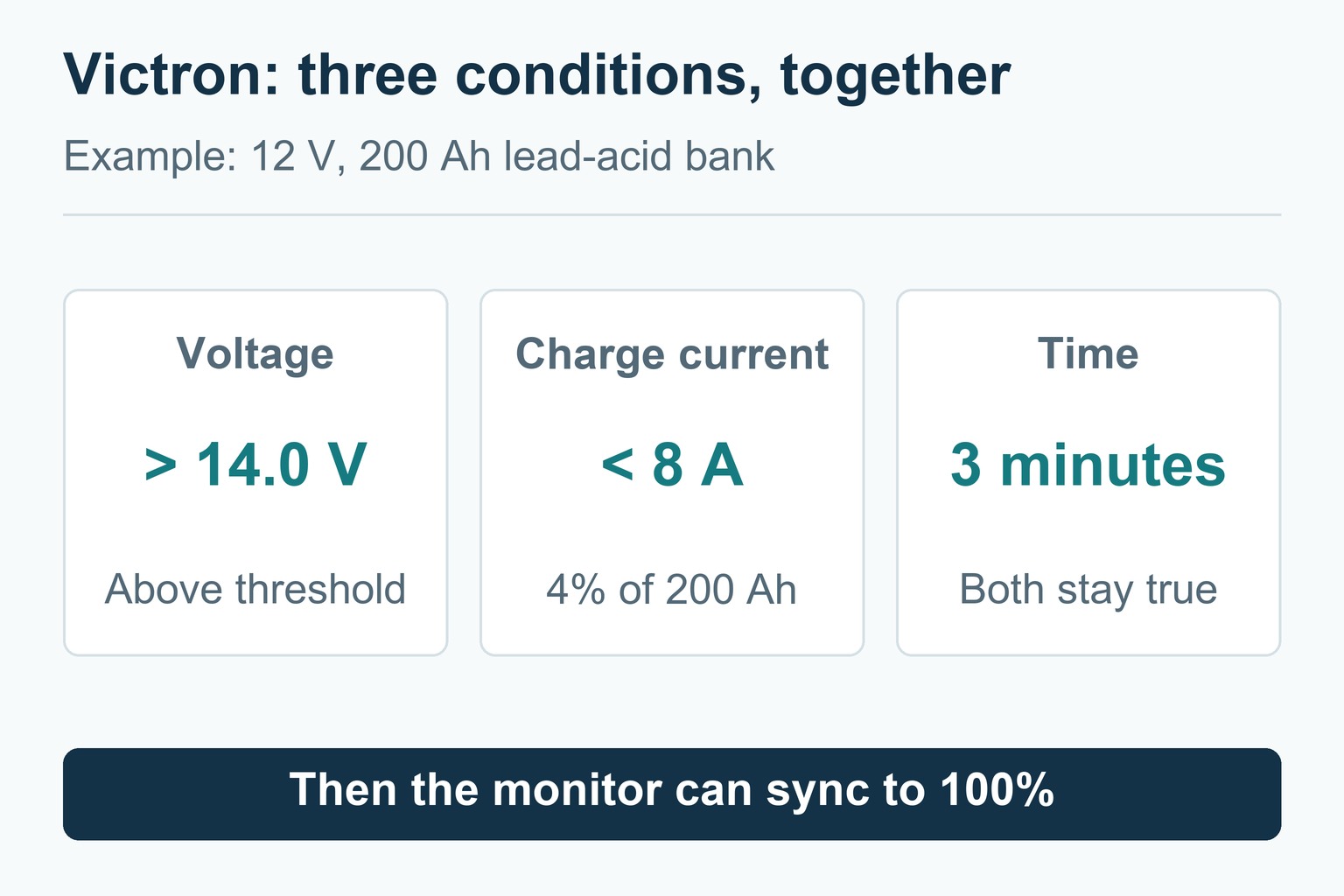
No single condition sets 100 percent. The 8 A is 4 percent of the 200 Ah capacity; at 100 Ah the same setting gives 4 A. - Renogy 500A Battery Monitor: the menu holds CAP, Full V, Zero V, Alarm, Atten and PowOff, and CAP ships at 100 Ah. There’s no tail current or detection time: once the voltage rises above Full V, the monitor sets 100 percent. Full V and Zero V ship at 0 V, which leaves them inactive, and Renogy warns against setting them without knowing the battery’s full and empty voltages. Without Full V, hold down the up button when the bank is full to set 100 percent yourself.
Until that first full charge, treat the percentage as provisional. If you know the bank is full, a manual sync gets you started; if not, let the chargers finish the job first.
Test the Readings
Check the monitor against loads you know before you trust it:
- Everything off: the current should read close to zero. A small draw that won’t go away is usually real, from detectors and control boards, so don’t calibrate it away. Victron calls a zero-current calibration almost never needed, and valid only with every cable removed from the shunt’s system side.
- One known DC load: switch on a steady load, such as the lights or a fan on a fixed setting. The monitor should show a discharge, negative on Victron’s shunts, close to what that load draws.
- One charger, loads off: charging shows as a positive current if the bank has room to take it; a full battery accepts very little. With loads running, the monitor shows only the difference, so a 30 A charger feeding 40 A of loads still reads 10 A of discharge.
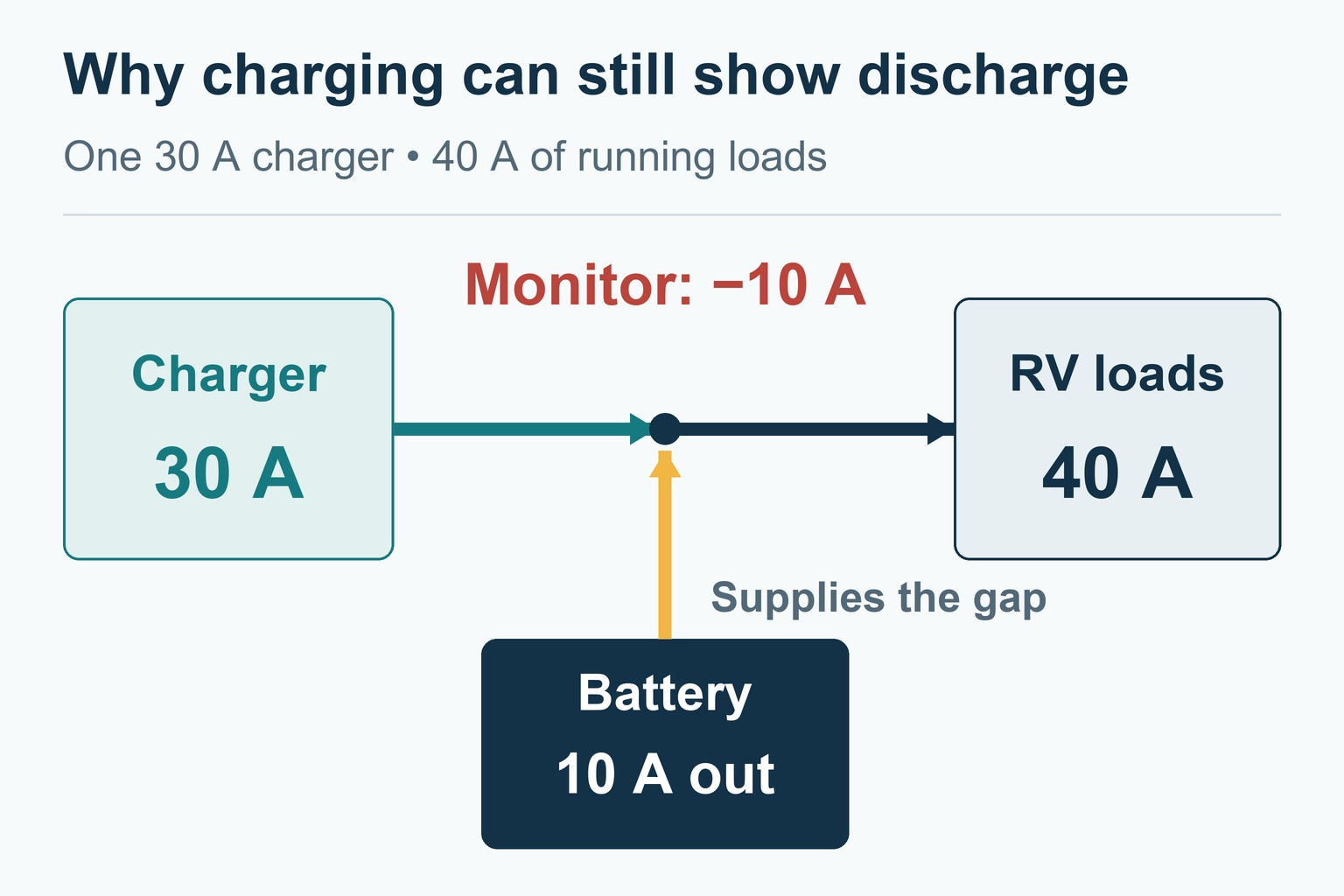
The charger still helps: the bank supplies 10 A instead of the full 40 A, so it drains at a quarter of the rate it would with the charger off. - A clamp meter cross-check: zero a DC clamp meter as its manual says and clamp one conductor that carries all of the bank’s current, such as the main positive if every positive connection leaves through it. Under a steady load, the readings should agree within the instruments’ tolerances; Victron specifies ±0.4 percent for the SmartShunt, so allow for the clamp meter’s own tolerance from its manual. If they don’t, check the clamp’s position and zero before hunting for a bypass, then look for a load or charger return still connected directly to the bank’s negative terminal. Current in one of those bypasses the shunt; the battery cable to the shunt and the links between batteries are meant to carry current.
If the readings still look wrong, this table narrows it down:
Scroll sideways to see every column.
| Symptom | Likely cause | What to check |
|---|---|---|
| Monitor stays dark | Sense-lead fuse out or blown, lead behind an open disconnect, loose data cable | The fuse, where the lead lands, the cable at both ends |
| Current reads zero under load | Loads and battery on the same side of the shunt, or current bypassing it | Only the bank’s cable on the battery side; clamp the shunt cables under load |
| Charging shows as discharge | Loads larger than the charge, swapped heavy cables, or the direction setting | With chargers off and a known DC load on, the monitor should show a discharge. If it doesn’t, check the terminal labels and, on Victron firmware 4.19 or later, the current measurement direction; rewire only if the cables really are reversed, with every source isolated |
| Renogy backlight blinks with chargers off and a load running | B- and P- wired the wrong way round | B- and P- against Renogy’s wiring diagram; if they’re reversed, isolate every source before swapping them. A slow blink while charging is normal |
| Percentage drifts over several days | A lead bypassing the shunt, the wrong capacity, or no full charge | Leftover wires on the bank’s negative terminal, the capacity entry, a full charge |
| Victron never reaches 100% | Charged voltage above what the charger reaches, or tail current below its cutoff | End-of-charge voltage and current against the settings |
| Victron jumps to 100% too early | Charged voltage set too low, often with solar | Charged voltage just under absorption, a longer detection time |
| Renogy percentage doesn’t match a known full charge | No manual sync, or Full V set wrong | With Full V at 0 V, hold the up button only once the bank is confirmed full; with Full V set, compare it with the voltage the bank reaches at the end of a full charge |
| Reads 100% but the lights dim quickly | Capacity set too high, a worn bank, or voltage drop at a poor connection | The capacity entry, a capacity test, connections that run warm under load |
| Bluetooth won’t connect | Phone permissions, distance, or the pairing PIN | App permissions, distance, the PIN on the label; Victron’s default is 000000 |
Safety
- A battery bank can push enough current through a short to melt metal. A wrench across the positive terminal and the frame can weld itself in place. Use insulated tools, remove rings and watches, cover the positive terminal, and keep the new battery cable off the bank until the last step.
- A disconnect isolates only what’s wired through it. Solar in daylight, the charge line from a tow vehicle and detectors wired around the switch can all stay live.
- Fuse the sense lead at the battery end. An unfused thin wire on a large bank is a fire risk.
- Flooded batteries give off hydrogen on charge. Keep sparks away, keep their ventilation clear, and wear eye protection.
- Heavy connections need the right lug and the right torque. A loose one heats up under high current, often behind a panel where no one sees it.
- Get professional help for an inverter/charger with a transfer switch, a lithium BMS that communicates with other equipment, or wiring you can’t trace with confidence.
FAQs
- Where should a battery monitor shunt be installed in an RV? In the bank’s negative cable, a short run from the battery, with the bank’s negative terminal as the only connection on its battery side. Thornwave’s PowerMon-5S and Lippert’s Battery Monitor (manual CCD-0006452) use the positive cable and need their own installation instructions.
- What belongs on the shunt’s system side? Every negative that carries load or charging current, from the converter and inverter to the solar and DC-DC chargers, plus the chassis bond, through a bus bar if they won’t all fit. Sensor and communication leads follow their own manuals.
- How do you hook up a battery monitor display? Run the supplied data cable from the shunt to the display through grommeted pass-throughs, plug it in, then mount the display in its cutout. A SmartShunt has no display and pairs with the VictronConnect app instead.
- Do I need a shunt, or can I go by the voltage? Voltage sags under load, rises on charge and barely moves across most of a LiFePO4 battery’s charge; a lead-acid battery’s resting voltage is a fair guide, but only after hours without charging or load. A shunt counts the charge itself, though lithium batteries whose BMS already reports state of charge may not need one.
- Do I need a fuse on the positive sense wire? Yes, as close to the battery positive as you can fit it. Victron’s leads include one; where a kit has none, add an inline fuse.
- Can I install an RV battery monitor myself? Yes, if you’re comfortable with 12 V wiring and have the tools to crimp and torque heavy cable. Getting every negative onto the right side of the shunt is the part that takes care.
Conclusion
Don’t wait for a cold night with the furnace running to find out whether the monitor is right. After the first full charge, test in stages: one known DC load first, then the combinations you really use, such as the microwave on the inverter with the furnace fan running, within the limits of the battery and its BMS, the inverter, the shunt, the cables and the fuses. Write down the voltage, the monitor’s current and which loads and chargers were on for each test. Next season, when a reading looks odd, you’ll compare it with a number instead of a memory.
Spot an error or an outdated detail in this guide?
Report it